Orchestrate human tasks
This tutorial shows how Easy BPM turns a process step into work for a person. You will deploy a form, deploy a BPMN process with a Human Task, start an instance with variables, complete the task, and check the process result.
What you will build
You will create a human-approval process that sends an expense request to a manager review task.
| Part | Purpose |
|---|---|
| Start | Receives the expense variables. |
| Manager Review | Shows request details and collects the approval decision. |
| End | Completes the process after the task is submitted. |
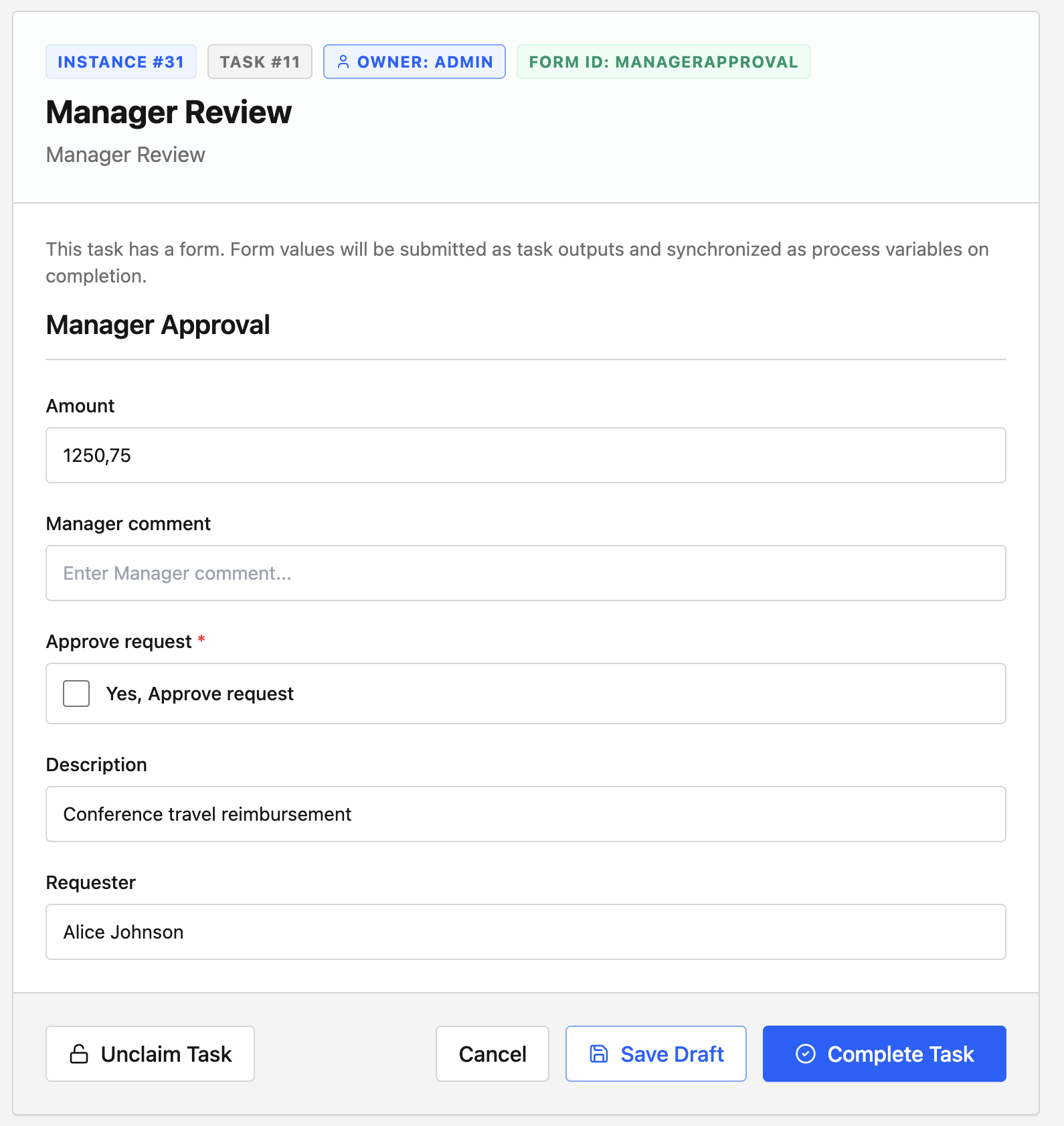
The form reads request details from process variables and writes the manager decision back to the process.
| Form field | Source |
|---|---|
| Requester | Process variable requesterName |
| Amount | Process variable amount |
| Description | Process variable description |
| Approve request | Task submission variable approved |
| Manager comment | Task submission variable comment |
Deploy the form
Create the form that the Task Portal will render for the manager:
curl -X POST http://localhost:8080/forms \
  -H "Authorization: Bearer $TOKEN" \
  -H "Content-Type: application/json" \
  -d '{
    "formId": "managerApproval",
    "name": "Manager Approval",
    "schema": {
      "type": "object",
      "title": "Manager Approval",
      "required": ["approved"],
      "properties": {
        "requesterName": {
          "type": "string",
          "title": "Requester"
        },
        "amount": {
          "type": "number",
          "title": "Amount"
        },
        "description": {
          "type": "string",
          "title": "Description"
        },
        "approved": {
          "type": "boolean",
          "title": "Approve request"
        },
        "comment": {
          "type": "string",
          "title": "Manager comment"
        }
      }
    }
  }'
Deploy the process
The complete BPMN file is available as human-approval.bpmn.
Save this as human-approval.bpmn:
<?xml version="1.0" encoding="UTF-8"?>
<bpmn:definitions xmlns:bpmn="http://www.omg.org/spec/BPMN/20100524/MODEL" xmlns:bpmndi="http://www.omg.org/spec/BPMN/20100524/DI" xmlns:dc="http://www.omg.org/spec/DD/20100524/DC" xmlns:easy="https://easybpm.local/bpmn/extensions" id="Definitions_human-approval" targetNamespace="https://easybpm.local/process/human-approval">
  <bpmn:process id="human-approval" name="Human Approval" isExecutable="true">
    <bpmn:extensionElements>
      <easy:metadata><![CDATA[{"version":"1.0"}]]></easy:metadata>
    </bpmn:extensionElements>
    <bpmn:startEvent id="start" name="start">
      <bpmn:extensionElements>
        <easy:node><![CDATA[{"id":"start","name":"start","type":"StartEvent","position":{"x":170,"y":130},"width":40,"height":40,"next":["manager-review"]}]]></easy:node>
      </bpmn:extensionElements>
    </bpmn:startEvent>
    <bpmn:userTask id="manager-review" name="Manager Review">
      <bpmn:extensionElements>
        <easy:node><![CDATA[{"id":"manager-review","name":"Manager Review","type":"HumanTask","position":{"x":370,"y":120},"width":140,"height":70,"next":["end"],"config":{"assignee":"admin","formId":"managerApproval","inputs":[{"targetName":"requesterName","type":"string","source":"variable","value":"requesterName"},{"targetName":"amount","type":"number","source":"variable","value":"amount"},{"targetName":"description","type":"string","source":"variable","value":"description"}],"outputs":[{"target":"process","sourceName":"approved","value":"approved"},{"target":"process","sourceName":"comment","value":"managerComment"}]}}]]></easy:node>
      </bpmn:extensionElements>
    </bpmn:userTask>
    <bpmn:endEvent id="end" name="end">
      <bpmn:extensionElements>
        <easy:node><![CDATA[{"id":"end","name":"end","type":"EndEvent","position":{"x":700,"y":130},"width":40,"height":40,"next":[]}]]></easy:node>
      </bpmn:extensionElements>
    </bpmn:endEvent>
    <bpmn:sequenceFlow id="Flow_1_start_manager-review" sourceRef="start" targetRef="manager-review"/>
    <bpmn:sequenceFlow id="Flow_2_manager-review_end" sourceRef="manager-review" targetRef="end"/>
  </bpmn:process>
  <bpmndi:BPMNDiagram id="BPMNDiagram_1">
    <bpmndi:BPMNPlane id="BPMNPlane_1">
      <bpmndi:BPMNShape id="start_di" bpmnElement="start">
        <dc:Bounds x="170" y="130" width="40" height="40"/>
      </bpmndi:BPMNShape>
      <bpmndi:BPMNShape id="manager-review_di" bpmnElement="manager-review">
        <dc:Bounds x="370" y="120" width="140" height="70"/>
      </bpmndi:BPMNShape>
      <bpmndi:BPMNShape id="end_di" bpmnElement="end">
        <dc:Bounds x="700" y="130" width="40" height="40"/>
      </bpmndi:BPMNShape>
      <bpmndi:BPMNEdge id="Flow_1_start_manager-review_di" bpmnElement="Flow_1_start_manager-review"/>
      <bpmndi:BPMNEdge id="Flow_2_manager-review_end_di" bpmnElement="Flow_2_manager-review_end"/>
    </bpmndi:BPMNPlane>
  </bpmndi:BPMNDiagram>
</bpmn:definitions>
Deploy it:
curl -X POST http://localhost:8080/processes \
  -H "Authorization: Bearer $TOKEN" \
  -H "Content-Type: application/xml" \
  --data-binary @human-approval.bpmn
Start with variables
Start the process by sending the variables that the task form should display:
curl -X POST http://localhost:8080/processes/human-approval/start \
  -H "Authorization: Bearer $TOKEN" \
  -H "Content-Type: application/json" \
  -d '{
    "variables": {
      "requesterName": "Alice Johnson",
      "amount": 1250.75,
      "description": "Conference travel reimbursement"
    }
  }'
Easy BPM creates a process instance and pauses at manager-review.
Complete the task
Open the Task Portal at http://localhost:3002, sign in as admin, and open the Manager Review task. The form should show the requester, amount, and description from the process start variables.
Submit the decision in the Task Portal, or complete the task through the API:
curl -X POST http://localhost:8080/tasks/123/complete \
  -H "Authorization: Bearer $TOKEN" \
  -H "Content-Type: application/json" \
  -d '{
    "variables": {
      "approved": true,
      "comment": "Approved for payment."
    }
  }'
Replace 123 with the task ID from the Task Portal or from the task search API.
Check the result
Open the Admin Console at http://localhost:3001 and inspect the process instance. After the task is completed, the instance should move to the end of the process.
You can also check the process variables through the API:
curl http://localhost:8080/processes/instances/456/variables \
  -H "Authorization: Bearer $TOKEN"
Replace 456 with the process instance ID returned when you started the process. The variables should include approved and managerComment.
Next steps
- Use groups and queues with User Tasks.
- Design richer forms with Forms.
- Attach uploaded files with Documents.