Run your first BPMN process
This tutorial walks through the fastest Easy BPM path: deploy a tiny approval process, start it, and confirm that Easy BPM created a process instance.
What you will build
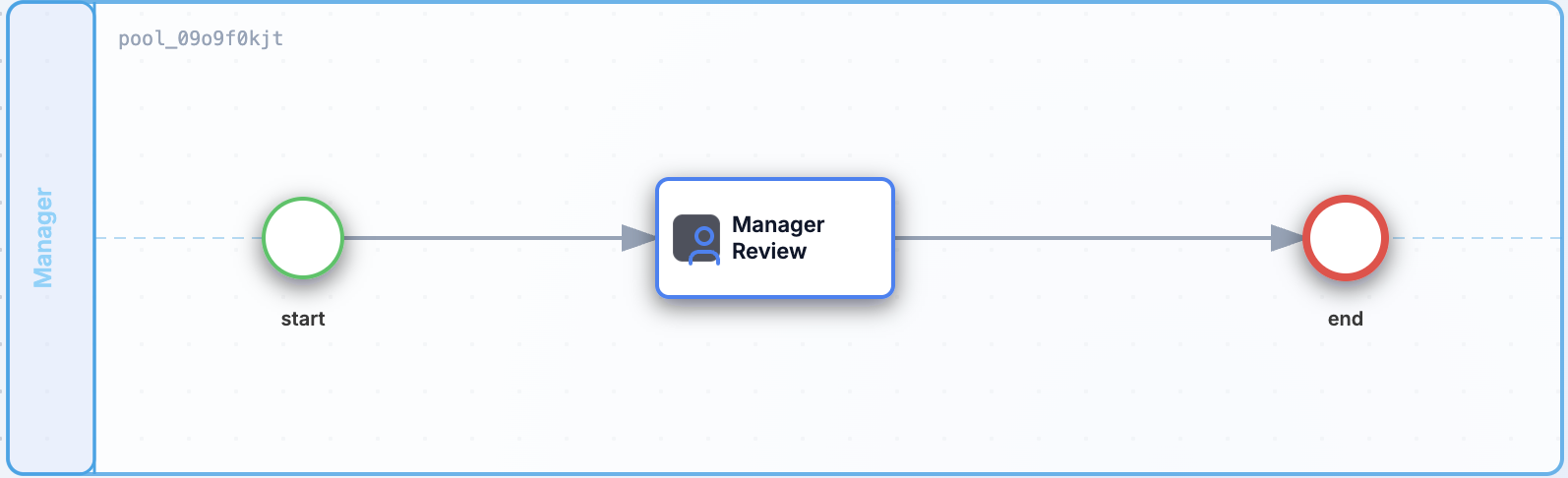
You will create an expense-approval process with three steps:
| Step | Purpose |
|---|---|
| Start | Creates a new process instance. |
| Manager Review | Pauses the process for a human decision. |
| End | Completes the process after the review. |
Before you start
Make sure Easy BPM is running locally and you are signed in as an administrator.
Useful setup pages:
Create an API token:
TOKEN=$(curl -s http://localhost:8080/auth/login \
  -H 'Content-Type: application/json' \
  -d '{"username":"admin","password":"admin"}' \
  | jq -r '.token')
Create the BPMN file
Save this as expense-approval.bpmn:
<?xml version="1.0" encoding="UTF-8"?>
<bpmn:definitions xmlns:bpmn="http://www.omg.org/spec/BPMN/20100524/MODEL" xmlns:bpmndi="http://www.omg.org/spec/BPMN/20100524/DI" xmlns:dc="http://www.omg.org/spec/DD/20100524/DC" xmlns:di="http://www.omg.org/spec/DD/20100524/DI" xmlns:easy="https://easybpm.local/bpmn/extensions" id="Definitions_expense-approval" targetNamespace="https://easybpm.local/process/expense-approval">
  <bpmn:process id="expense-approval" name="Expense Approval" isExecutable="true">
    <bpmn:extensionElements>
      <easy:metadata><![CDATA[{"exportedAt":"2026-09-09T17:24:06.978Z","version":"1.0"}]]></easy:metadata>
    </bpmn:extensionElements>
    <bpmn:startEvent id="start" name="start">
      <bpmn:extensionElements>
        <easy:node><![CDATA[{"id":"start","name":"start","type":"StartEvent","position":{"x":170,"y":130},"width":40,"height":40,"next":["manager-review"]}]]></easy:node>
      </bpmn:extensionElements>
    </bpmn:startEvent>
    <bpmn:userTask id="manager-review" name="Manager Review">
      <bpmn:extensionElements>
        <easy:node><![CDATA[{"id":"manager-review","name":"Manager Review","type":"HumanTask","position":{"x":370,"y":120},"width":120,"height":60,"next":["end"],"config":{"inputs":[],"outputs":[]}}]]></easy:node>
      </bpmn:extensionElements>
    </bpmn:userTask>
    <bpmn:endEvent id="end" name="end">
      <bpmn:extensionElements>
        <easy:node><![CDATA[{"id":"end","name":"end","type":"EndEvent","position":{"x":700,"y":130},"width":40,"height":40,"next":[]}]]></easy:node>
      </bpmn:extensionElements>
    </bpmn:endEvent>
    <bpmn:sequenceFlow id="Flow_1_start_manager-review" sourceRef="start" targetRef="manager-review"/>
    <bpmn:sequenceFlow id="Flow_2_manager-review_end" sourceRef="manager-review" targetRef="end"/>
  </bpmn:process>
  <bpmndi:BPMNDiagram id="BPMNDiagram_1">
    <bpmndi:BPMNPlane id="BPMNPlane_1">
      <bpmndi:BPMNShape id="start_di" bpmnElement="start">
        <dc:Bounds x="170" y="130" width="40" height="40"/>
      </bpmndi:BPMNShape>
      <bpmndi:BPMNShape id="manager-review_di" bpmnElement="manager-review">
        <dc:Bounds x="370" y="120" width="120" height="60"/>
      </bpmndi:BPMNShape>
      <bpmndi:BPMNShape id="end_di" bpmnElement="end">
        <dc:Bounds x="700" y="130" width="40" height="40"/>
      </bpmndi:BPMNShape>
      <bpmndi:BPMNEdge id="Flow_1_start_manager-review_di" bpmnElement="Flow_1_start_manager-review">
      </bpmndi:BPMNEdge>
      <bpmndi:BPMNEdge id="Flow_2_manager-review_end_di" bpmnElement="Flow_2_manager-review_end">
      </bpmndi:BPMNEdge>
    </bpmndi:BPMNPlane>
  </bpmndi:BPMNDiagram>
</bpmn:definitions>
You can also build this visually in the Modeler by connecting a Start Event, a Human Task, and an End Event.
Deploy the process
curl -X POST http://localhost:8080/processes \
  -H "Authorization: Bearer $TOKEN" \
  -H "Content-Type: application/xml" \
  --data-binary @expense-approval.bpmn
Easy BPM stores the process definition and assigns it a version. Deploying the same process key again creates a new version without deleting older runtime history.
Start an instance
curl -X POST http://localhost:8080/processes/expense-approval/start \
  -H "Authorization: Bearer $TOKEN"
The response contains the new process instance. Because the process includes a human task, the instance pauses at manager-review until someone completes the task.
Check the result
Open the Task Portal at http://localhost:3002 and look for the Manager Review task.
Open the Admin Console at http://localhost:3001 to check the process instance status. The instance should appear in the process instances list, with the current node showing that execution is waiting at manager-review.
You can also list process instances through the API:
curl "http://localhost:8080/processes/instances?page=0&size=20" \
  -H "Authorization: Bearer $TOKEN"
Next steps
- Add form fields to the review step with Forms.
- Learn the full process model in Create a Process.
- Monitor and move active instances from Operations.